> For the complete documentation index, see [llms.txt](https://docs.punkland.io/llms.txt). Markdown versions of documentation pages are available by appending `.md` to page URLs; this page is available as [Markdown](https://docs.punkland.io/punkland-studio/studio/studio-interface.md).
# Studio Interface
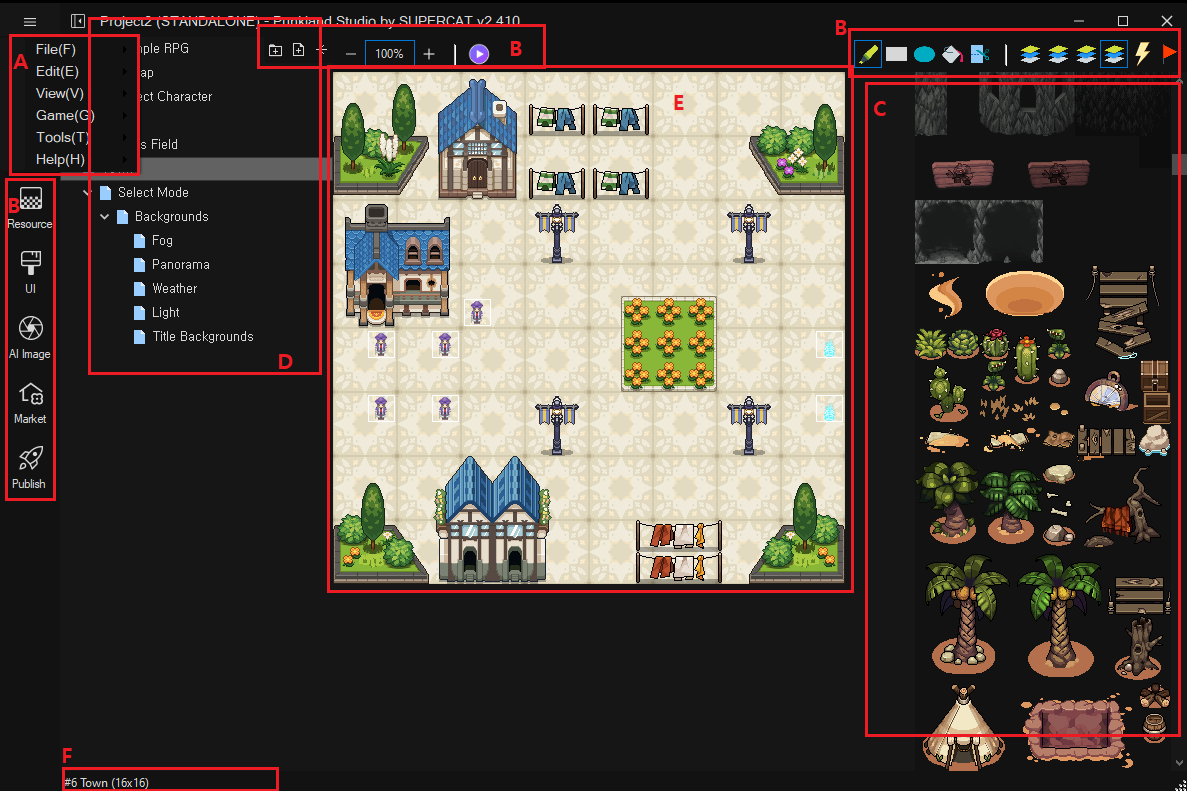
{% tabs %}
{% tab title="A" %}
Main menu
{% endtab %}
{% tab title="B" %}
Tool bar
{% endtab %}
{% tab title="C" %}
Map Tileset
{% endtab %}
{% tab title="D" %}
Map list
{% endtab %}
{% tab title="E" %}
The map you are currently editing is displayed. For example, when editing the **\[Character Selection Screen]**, the following screen will appear:
{% endtab %}
{% tab title="F" %}
The selected map's **name**, **size**, and **display ratio** are shown.
{% endtab %}
{% endtabs %}