> For the complete documentation index, see [llms.txt](https://docs.punkland.io/llms.txt). Markdown versions of documentation pages are available by appending `.md` to page URLs; this page is available as [Markdown](https://docs.punkland.io/punkland/punkland-studio/start/undefined-2.md).
# 레이아웃 관리자
> **\[도구] - \[레이아웃 관리자]** 를 클릭하면, 레이아웃 편집 팝업 창이 뜹니다.
>
> 각종 컨트롤과 커스텀 메뉴 관리, 퀵슬롯 추가 등등 기능이 포함되어 있습니다.
> **① 페이지 리스트**
>
> 레이아웃 관리자는 페이지 단위로 레이아웃을 관리합니다.
>
> **② 컨트롤 상자**
>
> 레이아웃 페이지 안에 컨트롤을 생성할 수 있습니다.
>
> **③ 컨트롤 리스트**
>
> 선택된 페이지에 생성된 컨트롤을 볼 수 있습니다.
>
> **④ 속성 상자**
>
> 페이지, 컨트롤 등의 속성을 보거나 설정할 수 있습니다.
>
> **⑤ 퀵메뉴 상자**
>
> 아이콘 형태로 되어있으며, 초기화, 저장, 내보내기, 불러오기, 커스텀 메뉴 관리자 및 컨트롤 생성 기능으로 구성되어 있습니다.
>
> **⑥ 레이아웃 뷰**
>
> 인게임에서 보여질 형태를 미리볼 수 있으며, 컨트롤을 세부적으로 조절할 수 있습니다.
> **레이아웃 종료 시**
>
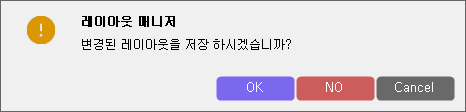
> 레이아웃 편집을 끝내고, 해당 팝업 창을 종료하면, 아래와 같은
>
> **“변경된 레이아웃을 저장하시겠습니까?”** 팝업 창이 나타납니다.
>
> **“OK”클릭 시**
>
> 편집한 내용들이 저장되고 관리자가 종료됩니다.
>
> **“NO”클릭 시**
>
> 편집한 내용들을 저장하지 않고 관리자가 종료됩니다.
>
> **“CANCEL” 클릭 시**
>
> 창을 끕니다.
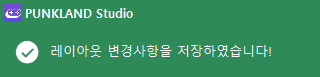
> **저장 완료 시 알림**
>
> 저장을 완료하게 되면 해당 알림과 함께 변경 사항이 적용됩니다.